🍒 redux
Redux能集中式管理React应用中多个组件共享的状态。能不用redux就不用,维护状态非常吃力了再用redux。
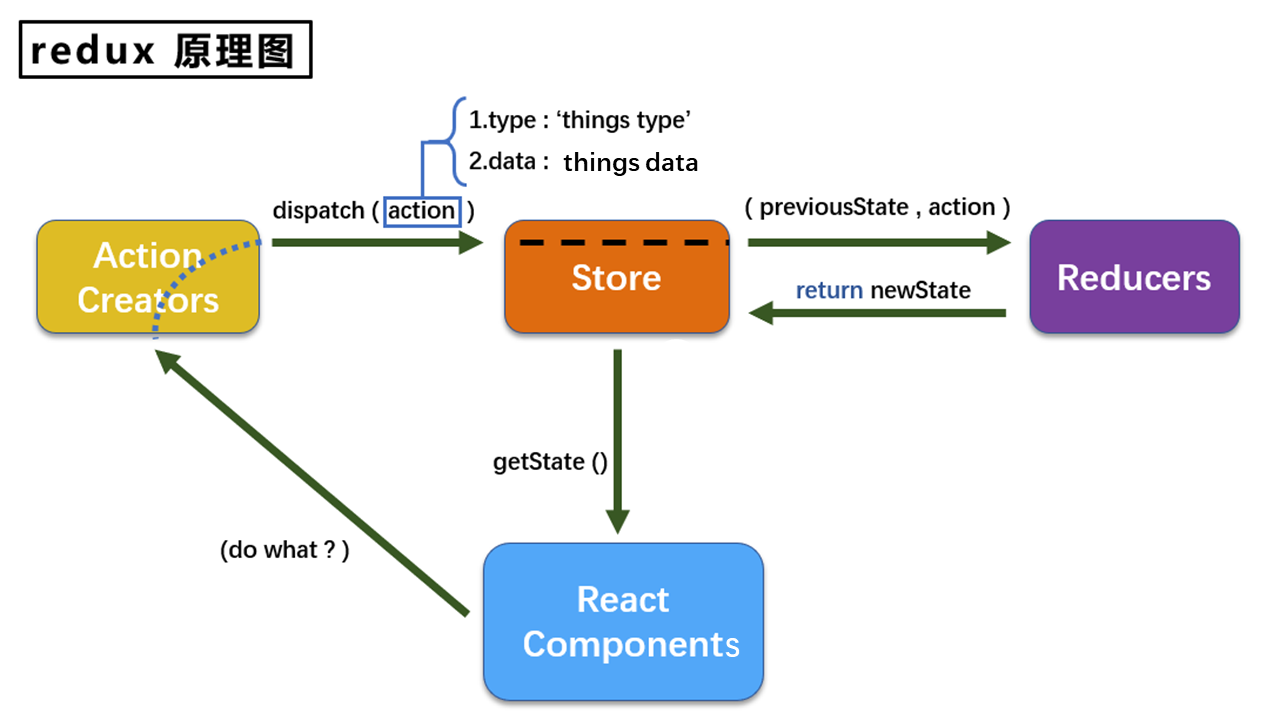
下面用一个求和案例去说明 reducer、store和action的编写方式。
store
单个reducer的store
store暴露给组件,给予状态获取。
import {createStore} from 'redux';
import countReducer from './count_reducer';

export default createStore(countReducer);
多个reducer的store
注意
这样写之后,state就变成了一个对象,如果想通过reducer取出对应的数据,就需要state.count。
import {createStore, combineReducers} from 'redux';
import countReducer from './count_reducer';
import personReducer from './person_reducer';

const allReducer = combineReducers({
    count: countReducer,
    persons: personReducer
});

export default createStore(allReducer);
action
一般的格式为:{type: "xxx", data: "yyy"},这个文件专门为Count组件生成action对象。
讲道理应该有一个文件 constant.js 定义 type 字符串的常量。
export const INCREMENT = "increment";
export const DECREMENT = "decrement";
接下来若是出现了全大写的变量,均为常量文件的定义,会省略其import。
同步action
action是一般对象,为同步的。
export const createIncrementAction = data => ({type: INCREMENT, data});
export const createDecrementAction = data => ({type: DECREMENT, data});
异步action
action是函数,为异步的。(不是一个必须使用的东西,也有替代方案)
export const createIncrementAsyncAction = (data, time) => {
    return (dispatch) => {
        setTimeout(()=>{
            dispatch(createIncrementAction(data));
        }, time);
    }
}
但是需要一个中间件让redux实现异步action(让redu调用这个返回的函数):redux-thunk。
接下来要修改的地方是在store.js里。
- 引入
applyMiddleware和thunk - 创建
store的时候应用中间件thunk
import {createStore, applyMiddleware} from 'redux';
import countReducer from './count_reducer';
import thunk from 'redux-thunk';

export default createStore(countReducer, applyMiddleware(thunk));
reducer⭐
下面代码是用于创建一个为Count组件服务的reducer,它本质上是一个函数。
reducer函数会接受到两个参数,分别是:之前的状态preState,动作对象action
function reducer(preState = 0, action) {
    const {type, data} = action;
    switch (type) {
        case INCREMENT:
            return preState + data;
        case DECREMENT:
            return preState - data;
        default:
            return preState;
    }
}
组件与redux
import store from './store';
import {createIncrementAction, createDecrementAction} from './count_action';

class Count extends Component {
    // 加法
    increment = () => {
        store.dispatch(createIncrementAction(1));
    }
    // 减法
    decrement = () => {
        store.dispatch(createDecrementAction(1));
    }
    componentDidMount(){
        // 检测redux中状态变化,只要变化,就触发回调
        store.subscribe(()=>{
            this.setState({});
        })
    }

    render() {
        ......
        {store.getState()} // 获取state的方式
        ......
    }
}
关于订阅状态更肮脏的写法
可以像BrowserRouter一样,写在最外边。
ReactDOM.render(<App/>, document.getElementById('root'));

store.subscribe(()=>{
    ReactDOM.render(<App/>, document.getElementById('root'));
})